
#คำสั่ง Linux
บทความทั้งหมดที่ติดแท็กนี้
Change OpenSSH Port On CentOS 7
Change OpenSSH Port On CentOS 7 sudo vi /etc/ssh/sshd_config แก้ไข Port 2299 (เลขพอร์ตที่ต้องการ) sudo yum -y install policycoreutils-python wget unzip perl-Data-Dumper sudo semana
Install perl-Data-Dumper
To fix problem install perl-Data-Dumper with YUM: yum install perl-Data-Dumper ที่มา : https://arstech.net/fix-webmin-error-failed-dependencies-perldatadumper/
How to install dig on CentoS 7
How to install dig on CentoS 7 sudo yum install bind-utils
Clear ssh history on Cenos And Ubuntu.
cat /dev/null > ~/.bash_history && history -c && exit
error: db5 error(-30973)
error: db5 error(-30973) from dbenv->open: BDB0087 DB_RUNRECOVERY: Fatal error, run database recovery error: cannot open Packages index using db5 - (-30973) error: cannot open Packages database in /va
xfs_repair CentOS7
sudo xfs_repair -v -L /dev/sda3
auto run script at boot time in centos7
ตั้งค่า ในไฟล์ /etc/rc.d/rc.local กำหนดสิทธิ์ chmod +x /etc/rc.d/rc.local
Speedtest-cli บน CentOS / RHEL
Install python sudo yum install python Download speedtest_cli.py wget -O speedtest-cli https://raw.githubusercontent.com/sivel/speedtest-cli/master/speedtest.py chmod +x sp
วิธีเปลี่ยน IP Server Directadmin
ติดตั้ง license Directadmin ใหม่ cd /usr/local/directadmin/scripts ./getLicense.sh ClientID LicenseID /etc/init.d/directadmin restart เปลี่ยน IP สำหรับ Directadmin cd /usr/local/directadmin/scripts ./
remove gnome desktop
If GUI is troubling you, login through CUI(Ctrl+Alt+F1) Check if "ppa-purge" package is installed or not. Run dpkg -l | grep ppa-purge If it returns the value, "ppa-purge" is installed. If not
Delete terminal history in Linux
You can clear your bash history like this: cat /dev/null > ~/.bash_history && history -c && exit cat /dev/null > ~/.bash_history erases the content of the ~/.bash_history file.
วิธีเพิ่ม Swap โดยไม่ต้องสร้าง Partition ใหม่
ขั้นตอนง่ายๆ ครับ ไม่มีอะไร ไม่ต้องแบ่ง partition ใหม่ให้ยุ่งยาก แค่สร้าง dump file ขึ้นมาให้เท่ากับขนาดของ swap ที่ต้องการได้เลยโดยใช้คำสั่ง 1. สร้างพื้นที่สำหรับใช้เป็น swap dd if=/dev/zero of=/
เปิด EPEL Repo ของ CentOS 5, CentOS 6 and CentOS 7
What is the EPEL repo? The EPEL (Extra Packages for Enterprise Linux) yum repository is an excellent source for additional packages for CentOS. Instead of having to compile applications that aren’t in
CentOS : เปลี่ยน repo มาใช้ในไทย เพื่อให้ yum ได้เร็วขึ้น
CentOS : เปลี่ยน repo มาใช้ในไทย เพื่อให้ yum ได้เร็วขึ้น 1. ดูก่อนว่า CentOS มี list ของ repo อะไรอยู่บ้าง # yum-config-manager base จะได้ผลลับดังนี้ Loaded plugins: fas
Advanced Audio Control on Linux
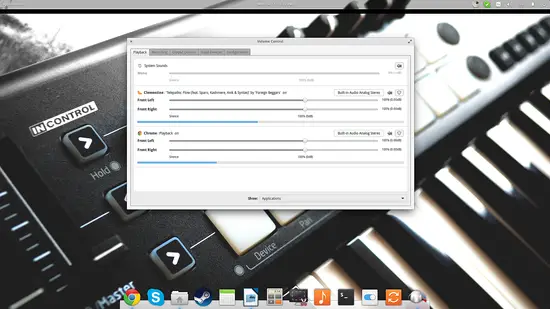 Pulse Audio Equalizer The Pulse Audio equalizer gives you the opportunity to set up and enable a system-wide equalizer
คำสั่งในการการปิดและ restart ระบบ Linux
ในการสั่งปิดระบบลีนุกซ์เซิร์ฟเวอร์ ผู้ดูแลระบบสามารถสั่งได้หลายวิธีด้วยกัน โดยมีรูปแบบคำสั่งดังนี้ รูปแบบ shutdown -a เรียกใช้ไฟล์ /etc/shutdown.allow -t
การจัดการบริการบน CentOS Linux 7.0 ด้วย Systemd
การจัดการบริการบน CentOS Linux 7.0 ด้วย Systemd โพสต์โดย slwt2002 » พุธ 29 ต.ค. 2014 12:51 pm การจัดการบริการบน CentOS Linux 7.0 ด้วย Systemd การจัดการบริการหรือ Services บนระบบปฏิบัติการ CentOS Linux
LinuxMint Basic Command – คำสั่ง พื้นฐานใน LinuxMint
LinuxMint Basic Command – คำสั่ง พื้นฐานใน LinuxMint คำสั่ง ls (list) แสดงรายชื่อไฟล์ที่อยู่ในไดเรคทอรี่ปัจจุบัน รูปแบบการใช้งาน ls … ตัวอย่างการใช้งาน ls ความหมาย : แสดงรา
คำสั่งตรวจสอบดูว่า top 10 ไฟล์ขนาดใหญ่
คำสั่งตรวจสอบดูว่า top 10 อันดับแรกที่มีขนาดไฟล์ใหญ่สุดอยู่ที่ไหน du -sk * | sort -nr | head เท่านี้ก็จะรู้แล้วครับว่าไฟล์ไหนที่ทำให้พื้นที่เต็ม
การทดสอบความเร็วของฮารดดิสก์บนลินุกซ์ ด้วยคำสั่ง dd
ทดสอบความเร็วในการเขียนไฟล์ขนาด 1GByte # dd if=/dev/zero of=filetest.bin bs=1000000 count=1000 1000+0 records in 1000+0 records out 1000000000 bytes (1.0 GB) copied, 3.96078 seconds, 252